Compliance Built Around Desktop Accounting Workflows
How QuickBooks Desktop Data Reaches Advintek
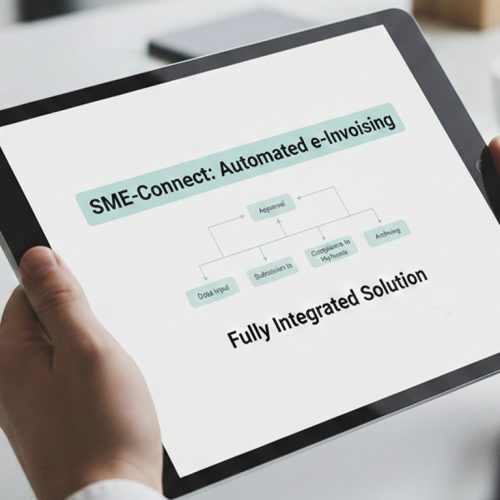
- Source Data Transfer: QuickBooks Desktop invoice information enters Advintek through an integration layer for controlled electronic processing.
- Accounting Field Review: Relevant invoice fields are examined to identify incomplete or inconsistent information before processing continues.
- Invoice Content Preparation: Validated accounting data is organised into structured electronic invoice information for connected workflows.
- Processing Route Management: Prepared invoice information follows defined processing stages with visibility across connected finance activities.
- Response Information Capture: Processing outcomes are recorded so accounting teams can identify exceptions and address required corrections.
- Historical Data Organisation: Completed invoice information is organised for reconciliation, review, reporting, and accessible business records.
What Does the Desktop Connector Handle
Advintek connects QuickBooks Desktop with the invoice-processing layer, allowing accounting information to pass through validation, structured preparation, processing, and response handling without replacing the core desktop accounting environment.
- Connect QuickBooks Desktop invoice information securely
- Validate essential invoice details before processing
- Structure accounting data for electronic exchange
- Track processing responses across invoice workflows
Why QuickBooks Desktop Users Connect Advintek
- Familiar Desktop Accounting: Finance teams continue preparing invoices through QuickBooks Desktop while connected processing occurs through Advintek.
- Reduced Data Repetition: Automated checks reduce repeated manual review of invoice information across routine accounting activities.
- Cleaner Transaction Information: Structured validation helps identify incomplete or inconsistent accounting data before electronic processing begins.
- Better Workflow Visibility: Processing responses give finance teams clearer insight into invoice progress and unresolved exceptions.
- Practical System Integration: Advintek adds electronic invoice capabilities around established QuickBooks Desktop processes without replacing the accounting environment.
- South Africa Readiness: Structured processing helps organisations prepare QuickBooks Desktop workflows for the country’s evolving digital VAT environment.
South Africa E-Invoicing Tools for QuickBooks Desktop
Invoice Review Workspace
Review invoice information, validation outcomes, and processing exceptions across connected accounting activities.
Reconciliation Information Tools
Organise invoice and response information to assist finance teams with account reconciliation and transaction review.
Record Retrieval Controls
Access organised invoice records when teams require transaction history, supporting information, or review.
QuickBooks Desktop Support Across South Africa
Advintek supports businesses using QuickBooks Desktop across South Africa by connecting familiar accounting activities with structured electronic invoice processing.
- Create invoices through existing desktop routines
- Manage customer billing within QuickBooks Desktop
- Review invoice records during reconciliation
- Prepare accounting data for electronic processing
Get QuickBooks Desktop Ready for South Africa
Add connected invoice processing to your accounting operations.
With Advintek’s connected invoice integration.
Ready e-Invoice System
Frequently Asked Questions QuickBooks Desktop e-Invoicing South Africa
How can QuickBooks Desktop support South Africa e-invoicing?
QuickBooks Desktop can remain the accounting environment where invoice information is created and maintained, while Advintek provides the connected processing layer. Relevant invoice data can pass through mapping, validation, structuring, processing, and response handling. This gives businesses using QuickBooks Desktop a way to introduce e-invoice software without replacing established accounting procedures.
Which QuickBooks Desktop information can enter the e-invoice workflow?
Relevant invoice information can include customer details, transaction lines, tax information, totals, document references, and other available accounting fields. Advintek can map applicable information into structured processing workflows, apply configured checks, and capture processing responses. The exact information exchanged depends on the QuickBooks Desktop configuration and the integration design selected for the business.
How does SARS relate to QuickBooks Desktop e-invoicing?
SARS is developing a proposed Digital VAT Model that combines e-Invoicing, an Interoperability Framework, and e-Reporting. QuickBooks Desktop can serve as the accounting source while Advintek supports structured invoice-processing preparation around it. The final technical and participation requirements will depend on the development of the framework, applicable regulations, and implementation decisions.
Can Advintek work without replacing QuickBooks Desktop?
Advintek is designed to add an invoice-processing layer around an existing QuickBooks Desktop environment. Businesses can continue using their established desktop accounting procedures for invoice creation and financial administration, while relevant information is passed into connected validation and processing workflows. This separates electronic invoicing functions from the organisation’s core accounting operations.
What does QuickBooks Desktop gain from e-invoice software?
QuickBooks Desktop users can gain structured invoice validation, automated data preparation, processing visibility, exception handling, and organised electronic records through an integrated e-invoice software layer. Advintek connects these functions with existing accounting information, helping finance teams reduce repetitive invoice administration while preparing their workflows for South Africa’s developing digital VAT environment.